
Switching to Linux: Realistic Alternative or False Promise?

For years, the idea of switching from Windows to Linux in a business environment sat firmly on the fringe. It was something enthusiasts talked about, not something decision makers seriously considered. That is changing.
The renewed interest in Linux is not coming from ideology. It is coming from frustration. Hardware requirements, forced online accounts, constant cloud nudges, and AI features appearing whether they are wanted or not have pushed some long time Windows users to at least ask the question. What if there was another way?
This post is not about telling people to abandon Windows. It is about honestly answering whether Linux is a realistic alternative in 2026, and if so, where it actually makes sense.
Why Linux is being discussed again
Linux has always existed alongside Windows, but it rarely entered mainstream business conversations. The difference now is context.
Windows 11 has raised the baseline for what hardware is considered acceptable. Security requirements are stricter. Cloud integration is deeper. Choice feels narrower. At the same time, Linux has quietly improved in areas that used to hold it back, particularly usability, hardware support, and polish.
For the first time in a long while, the question is not “why would anyone switch to Linux”, but “why are people who never considered it now curious”.
What Linux does well in 2026
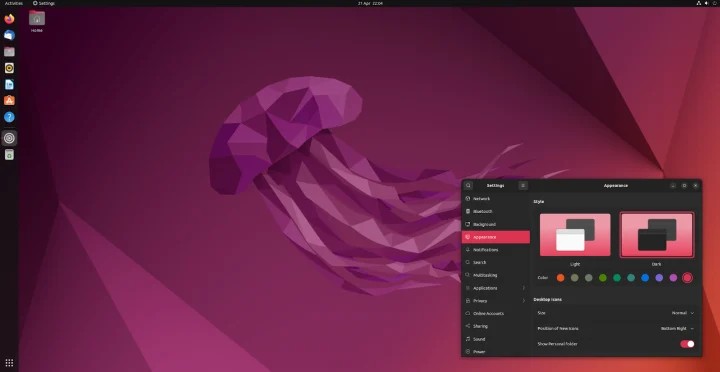
Modern Linux desktops are far removed from the rough edges many people remember. Distributions like Linux Mint and Ubuntu offer clean, stable environments that feel familiar to Windows users, especially those coming from Windows 10.
Everyday tasks work well. Web browsing, email, document editing, video calls, and general productivity are all well supported. For users who live primarily in a browser or cloud based tools, the difference between Windows and Linux can feel surprisingly small.
Linux also excels at extending the life of hardware. Machines that struggle under modern Windows builds often run smoothly on Linux. For businesses trying to control costs or reduce unnecessary replacement cycles, this alone can be appealing.
Security and stability are also strong points. Linux systems tend to update quietly, reboot less aggressively, and avoid the feeling that the operating system itself is constantly demanding attention.
Where Linux still struggles
This is the part that often gets glossed over, and it matters.
Linux is not a drop in replacement for Windows in many business environments. If your organisation relies on Windows specific applications, bespoke line of business software, or tight integration with Microsoft desktop tools, Linux will introduce friction.
User training is another consideration. Even with friendly interfaces like Linux Mint, users will notice differences. File paths, software installation, and system settings do not behave exactly the same. For some teams that is manageable. For others it becomes a support burden.
Vendor support can also be inconsistent. Many hardware manufacturers still prioritise Windows first. While Linux support is far better than it once was, it is not universal.
Linux works best where expectations are clear. It struggles when it is treated as a magic fix.
Why Linux Mint and Ubuntu are the sensible starting points

If someone is curious about Linux, the choice of distribution matters. Linux Mint and Ubuntu are usually the best places to start, not because they are the most exciting, but because they are predictable.
Linux Mint is often recommended for Windows users because it feels familiar and avoids unnecessary complexity. It focuses on stability and usability, which matters far more than novelty in a business context.
Ubuntu has the advantage of widespread adoption and strong community and commercial backing. That means documentation, updates, and long term support are easier to rely on. For businesses dipping a toe into Linux, that support ecosystem is important.
There are many other distributions, but starting simple reduces risk and disappointment.
Testing Linux without committing
One of the biggest mistakes people make is thinking a switch has to be all or nothing. It does not.
A sensible approach is to test Linux using a hypervisor. Running Linux inside a virtual machine allows users and IT teams to explore it without touching production systems. No data loss. No disruption. No pressure.
This approach lets people answer practical questions. Does the software we rely on work. How do users react. What breaks. What surprisingly works better.
For businesses, this kind of controlled testing is invaluable. It turns curiosity into informed decision making rather than guesswork. It is also a perfect stepping stone to broader discussions about virtualisation, sandboxing, and modern desktop strategies, which is something we can explore in more depth later.
Where Linux genuinely makes sense
Linux works best in specific scenarios.
Shared workstations.
Task focused roles.
Older hardware that still performs well.
Users who primarily work in browsers or cloud platforms.
In these environments, Linux can be stable, cost effective, and low maintenance. It can quietly do its job without constantly asking for attention.
Where Linux struggles is in mixed environments where Windows specific workflows are deeply embedded and expectations are not managed.
So is Linux the answer
Linux is not the answer for everyone. It is not a rebellion. It is not a replacement for Windows across the board.
What it is, is an option that deserves to be discussed calmly rather than dismissed out of hand.
The real story here is not Linux versus Windows. It is choice. The reason Linux interest is rising is because people feel that choice is shrinking elsewhere.
For some businesses, Linux will never make sense. For others, it will quietly solve problems they are tired of fighting.
The key is not switching for the sake of it, but understanding the landscape well enough to make an informed decision.
Related reading from the System Plus blog
This post sits alongside a wider series looking at where the Windows desktop is heading and why so many long-time users and businesses are starting to reassess their options.
If you want more context around why Linux is being discussed again, these are worth a read:
Windows 11: The Start of the Great Exodus
A broader look at why Windows 11 has created unease around privacy, performance, forced AI, and online dependency, and why some users are quietly pushing back.
TPM 2.0: Security Foundation or Hardware Trap?
A deep dive into Microsoft’s hardware requirements, what TPM 2.0 actually does, and why it has become such a flashpoint for upgrades and device replacement.
Windows 12: What We Know So Far
An overview of the current speculation around Windows 12, what Microsoft has and hasn’t confirmed, and why many people are already questioning what comes next for the desktop.
Taken together, these posts are not about promoting one operating system over another. They are about understanding the direction of travel, the trade-offs involved, and how businesses can make calmer, more informed decisions rather than reacting under pressure.
Share this:

Discover more from System Plus
Subscribe to get the latest posts sent to your email.